1.29.2007

Widget Update


Here's a updated version to my abRANDOM rss widget. In version 2.1.x I fixed a minor UI blemish, and I am now bundling a wide and a tall version to suite everyone's taste. You can either get it from the abRANDOM widgets page on my website, or you can use this direct download link.

1.28.2007

New Podcast Episode!

Just put up our latest podcast episode that I recorded with Bryan earlier today. We talked about some tech stuff, but mostly just fun chatting. I also got a small 4 channel sound board to do the mic mixing with. It worked quite well, it was able to boost the mic enough to where we could comfortably sit back and use the same mic.

Download 38:17 minutes @ 17.6mb

Story Links
Magic Water Harvesting Machine
Jeep Waterfall Video
Google is the new http://
P2P, if not for profit, is not illegal in Italy
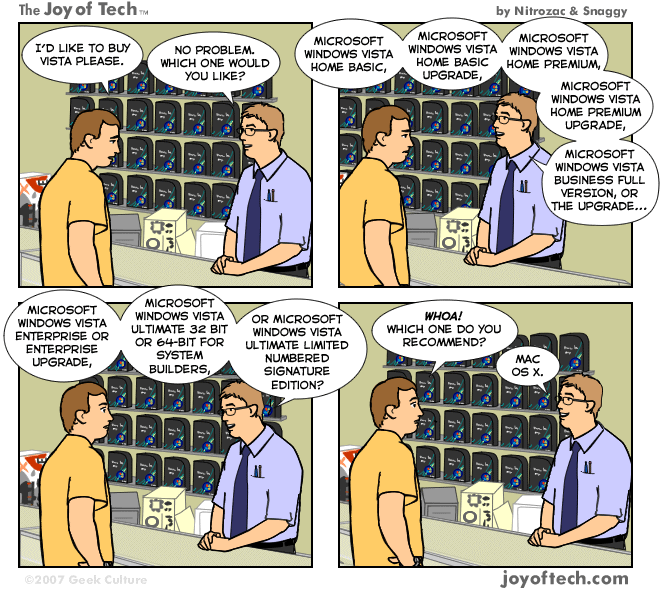
Vista Comic
Xbox 360 Cooler King add on
Where's your pet beaver? video

1.26.2007

abRANDOM rss Version 2 out!

I did a little UI tweaking on my rss widget. I think it looks nicer. Hop on over to my website to download it.

1.22.2007

Massive Debate

Well, I have a decision to make. Either I buy the Girffin iMic to make my .Audio 350 Plantronics headset work properly with my MacBook, or a buy the Blue Snowball. If I bought both the iMic and the .Audio 350 headset that would total of about $73. The Blue Snowball would be about a total of $107. So that would be a difference of about $34.

Also, I really want to record multiple people for a podcast, I may be able to use two mics with the Griffin iMic (one through the iMic, and another through the line in on my MacBook) but that is not guaranteed to work. With the Snowball recording multiple people would definitely work and it is supposed to have studio quality recording. So, what you you guys think?

1.20.2007

New podcast episode

Hey, sorry about the delay of getting a podcast episode up. I finally got one done and it is up and running in the flash player to the right. It's one of my shorter ones, about 10 minutes.

Download Episode 4 5.2mb at 11:12 minutes

Anyway, here are the stories that are covered in the podcast.
Worlds most dangerous roads
Video Game Covers
HD DVD Pirating
QuickSilver UserGuide
Game Wallpapers
Pirates of Silicon Valley
Mac OS Screenshots
Quinn
Firefox Cheat Sheet
Sweet Mac Setups

1.09.2007

My take on the iPhone

First of all, it looks like an awesome device. However, I probably will never own one myself.

The reasons for me not owning one are as follows:

1. Only for Cingular. I have Verizon and as far as I know Verizon isn't Cingular.

2. Hella expensive $499 for a 4GB model and $599 for an 8GB model? I don't think so. Apple wants this to be an iPod replacement, an that just won't work for me. I have a 9.63GB of music, about a GB of podcasts that I would sync to my iPod, and about 6GB of video.

The only really cool feature that I love the best is the web browsing. I love how the iPhone doesn't cripple the internet, and how you can zoom in on the pages. The only way that I would probably ever own an iPhone is if someone gave it to me and paid for the contract including internet access, which I know isn't cheap, at least for Verizon. But other than that, the iPhone is a pretty cool phone.

iPhone website

1.04.2007

abRANDOM rss Widget

I just made a widget for Mac OS X 10.4 or later that displays the articles of abRANDOM.

Here is a screen grab of it.


Download

1.03.2007

My Macish

After a few days of editing my website I am pleased to say that I have completed a new section called Macish. In my new section I have a collection of my favorite apps for OS X. So, if you're a Mac owner and have nothing better to do, go check out Macish on my website.

12.19.2006

The new digg.com

I have to say I am quite happy with the new digg. The new version was implemented very well. So, let's go over what's new.

The biggest difference that I think everyone will notice first is that the navigation between sections of digg is now at the top of the page instead of the previous left hand side. At first I didn't care for that change much, but after about 2 days of using it, the top navigation works very well. However, I am not a big fan of the blue and green menu bar at the top. It just seems like an odd color combination, but it is beginning to grow on me.

Another big change that has been made is that digg no longer has a static width. I love this improvement, because on my widescreen monitor digg can now stretch to fill my browser. This is a feature most of us have been waiting for.

Also, another thing that you will notice is that digg has now separated the news from the videos. I know the reason behind this is because there are now so many videos on digg, but I for one, am not a big fan of this new feature. Now, instead of seeing all of my tech news and videos on one page, I have to switch between pages to see both my news and videos. I believe that there should be an option to have both news and videos combined into one page.

Another addition to digg is the podcast section. I think that this is a cool idea, and a great way for people to discover new podcasts.

Top 10 in All Topics is also a new feature to digg. I am enjoying this feature for the most part. It's a great way to see what's hot right now.

Now in the videos section of digg, videos from supported sites, such as YouTube, can now be viewed without ever leaving digg. I feel that this is a great feature. It makes watching quick videos even quicker since you never have to leave digg.

Over all, I am very happy with the latest digg update. The only thing that I wasn't to pleased with was the blue and green menu bar, but again that should grow on me. So, I will leave you with a couple of screen grabs compareing digg v.4 to digg v.3 along with the updating screen.

digg out of service (before implementation of digg v.4)


digg v.4 (current version)


digg v.3

12.17.2006

abRANDOM episode 3

It's up! I now have an embedded player (located in the sidebar) that you can use as well. You can also subscribe the the podcast rss feed in the sidebar as well. In this episode I discuss a bunch of Apple news, the 3rd party wireless Wii sensor bar, and a 5mb hard drive from 1956 and a few other things.

Story Links
DiggDong
iTV Remote
Halo 3 beta sign ups
Illuminous
Wireless Wii Sensor Bar
iTude
Orbicule's Undercover
5mb Hard Drive

Download abRANDOM 003 17:18 minutes at 11.9mb

Newer Posts Older Posts Home

Modified by Blogcrowds